# Electron 中的 IPC 模块
Table of Contents
Inter-Process Communication (IPC),进程间通信,主要负责 Electron 中渲染进程跟主进程之间的通信。
ipcMain 和 ipcRenderer
ipcMain:是一个位于主进程的事件发射器模块,用于接收和处理渲染进程发送的异步和同步消息。也可以向渲染进程发送消息。
ipcRenderer:是一个位于渲染进程的时间发射器模块,提供了可以向主进程发送异步和同步消息的方法。也可以接收来自主进程的消息。
在 Electron 中,进程间通信是通过在 ipcMain 和 ipcRenderer 模块中定义的 “channels” 通道。
渲染进程到主进程(一)
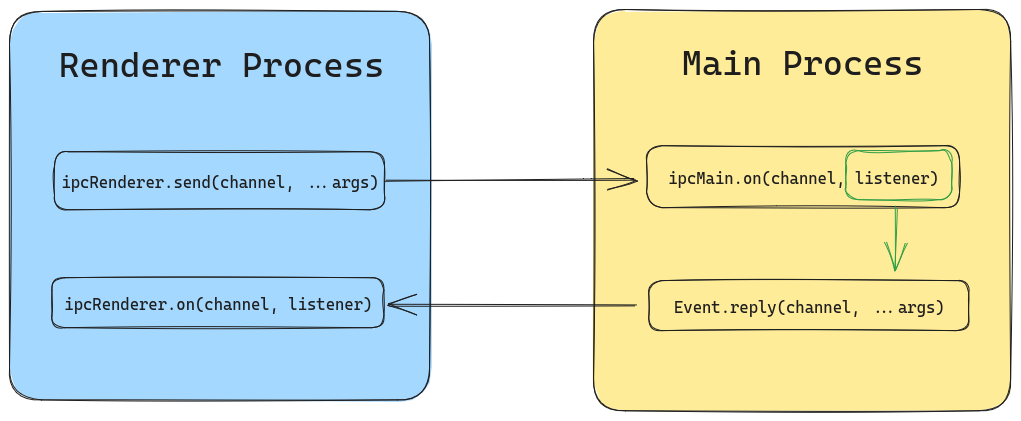
第一种从渲染进程到主进程的方式,是使用 ipcRenderer.send 发送消息和 ipcMain.on 接收消息。
以下是来自官网的一个例子:
-
在主进程使用
ipcMain.on监听事件。main.js function handleSetTitle(event, title) {const webContents = event.senderconst win = BrowserWindow.fromWebContents(webContents)win.setTitle(title)}app.whenReady().then(() => {ipcMain.on('set-title', handleSetTitle)createWindow()}) -
通过预加载暴露
ipcRenderer.send。preload.js const { contextBridge, ipcRenderer } = require('electron')contextBridge.exposeInMainWorld('electronAPI', {sendTitle: (title) => ipcRenderer.send('set-title', title),})默认情况下,渲染进程没有 Node.js 或 Electron 模块的访问权,需要通过
contextBridge.exposeInMainWorld来选择暴露的 API。在预加载脚本中暴露一个全局的window.electronAPI供渲染进程调用。 -
渲染进程调用
renderer.js btn.addEventListener('click', () => {window.electronAPI.sendTitle('Hello World!')})
如果需要主进程回复消息,则需要使用 event.replay。
渲染进程到主进程(二)
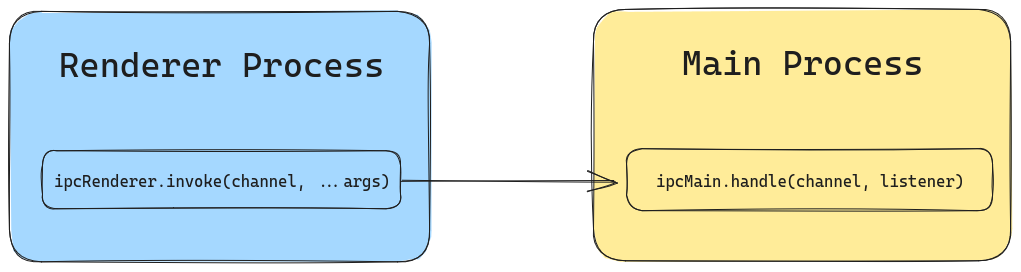
另一个更常见的方式是使用 ipcRenderer.invoke 发送消息和 ipcMain.handle 接收消息。
因为我们经常需要从渲染进程向主进程发送消息,并等待主进程的响应结果。
以下是来自官网的一个例子:
-
在主进程使用
ipcMain.handle监听事件。main.js async function handleFileOpen() {const { canceled, filePath } = await dialog.showOpenDialog({})if (!canceled) {return filePath[0]}}app.whenReady().then(() => {ipcMain.handle('dialog:openFile', handleFileOpen)createWindow()}) -
通过预加载暴露
ipcRenderer.invoke。preload.js const { contextBridge, ipcRenderer } = require('electron')contextBridge.exposeInMainWorld('electronAPI', {openFile: () => ipcRenderer.invoke('dialog:openFile'),}) -
渲染进程调用
renderer.js btn.addEventListener('click', async () => {const filePath = await window.electronAPI.openFile()})
如果需要主进程回复消息,则直接在 ipcMain.handle 里面 return 回去就可以了。而 ipcRenderer.invoke 会接收到一个异步的 Promise<pending> 的值。
据 What is the difference between IPC send / on and invoke / handle in electron? 里面的回答,invoke/handle 跟 send/on 并没有功能上的差别,而是一种更新更直观的 API 写法。
主进程到渲染进程
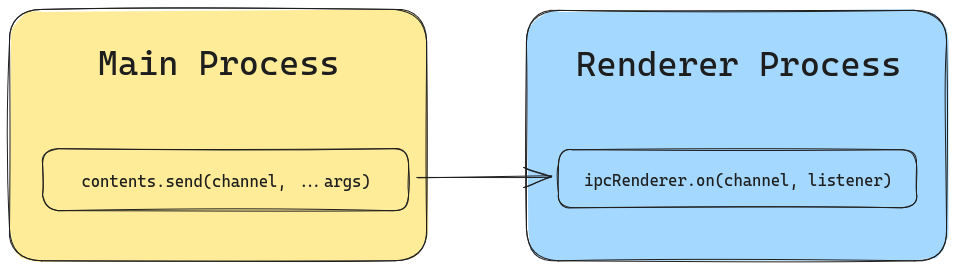
当你从主进程发送消息到渲染进程时,不再使用 ipcMain,而是通过 WebContents 实例,该实例包含了一个 send 方法。
以下是来自官网的一个例子:
-
使用
WebContents.send发送消息。main.js function createWindow() {const menu = Menu.buildFromTemplate([{label: app.name,submenu: [{click: () => mainWindow.webContents.send('update-counter', 1),label: 'Increment',},{click: () => mainWindow.webContents.send('update-counter', -1),label: 'Decrement',},],},])} -
通过预加载暴露
ipcRenderer.on。preload.js const { contextBridge, ipcRenderer } = require('electron')contextBridge.exposeInMainWorld('electronAPI', {onUpdateCounter: (callback) => ipcRenderer.on('update-counter', callback),})当加载预加载脚本之后,渲染进程可以监听
window.electronAPI.onUpdateCounter事件函数。 -
渲染进程调用
window.electronAPI.onUpdateCounter((event, arg) => {//...})
渲染进程到渲染进程(一)
渲染进程到渲染进程可以通过主进程作为中间人进行消息通讯。
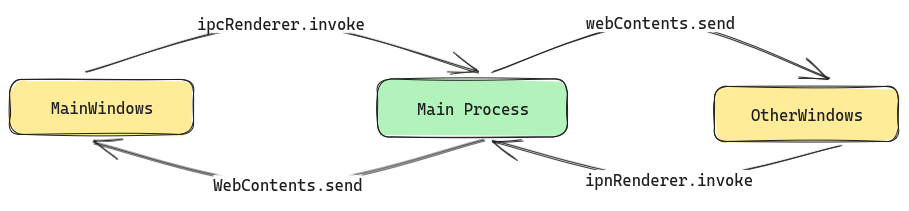
可以使用 Map 对象记录不同窗口的 webContents 对象。
const map = new Map()
const createWindow = () => {  const mainWindow = new BrowserWindow({    //...  })  const otherWindow = new BrowserWindow({    //...  })
  map.set('main', mainWindow.webContents)  map.set('other', otherWindow.webContents)}
渲染进程到渲染进程(二)
渲染进程到渲染进程可以通过 ipcRenderer.sendTo(webContentsId, channel, ...args) 来进行消息传递。
另一个渲染进程使用 ipcRenderer.on(channel, listener) 监听发来的消息。